The 40–60% of your AWS bill that's untagged, attributed.
CostDNA infers resource ownership from CloudTrail behaviour and writes the tags back. Your existing FinOps tool — CloudHealth, Vantage, Datadog CCM, Kubecost — suddenly explains 95% of spend instead of 50%.
Open source (MIT) · self-hosted, no data leaves your account · methodology peer-validated on Microsoft Azure 2.6M-VM dataset
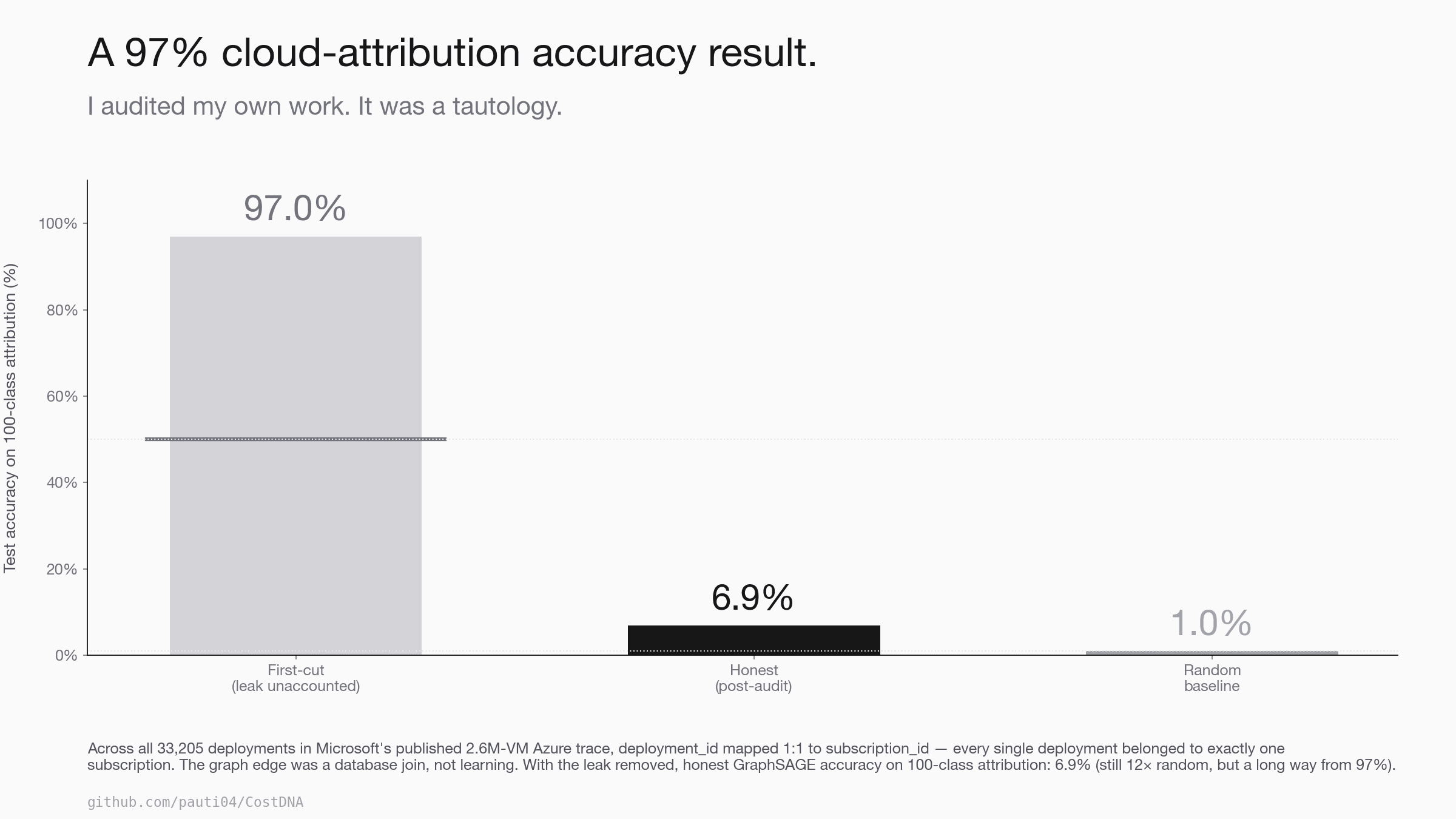
Microsoft Azure 2.6M-VM trace · before/after the deployment_id leak audit · why this matters →
Who this is for
CostDNA solves the same problem from three angles. If any of these is the conversation you keep having on Mondays, this is the tool.
You own the AWS bill but can't say who spent what.
Half your line items are untagged or mis-tagged. The CFO asks 'why is RDS up 30%?' and the honest answer is 'we have to chase it down by hand each time.' CostDNA infers the team behind each resource and writes tags back, so the next CFO question answers itself.
Your tag-enforcement policy doesn't cover legacy spend.
Tag policies catch new resources. They do nothing about the 5 years of accumulated untagged production workload that nobody on your team provisioned themselves. CostDNA gives you a defensible per-team breakdown of that legacy mess without a tagging sprint.
Per-team chargeback is impossible at your current tag coverage.
You can't budget by team if 50% of spend is in 'untagged.' CostDNA's inferred attributions come with calibrated confidence (post-hoc temperature scaling) so you can publish a per-team P&L with explicit confidence bands — and exclude anything below your threshold from the chargeback rather than guessing.
Try it on your AWS bill
Drop your AWS Cost & Usage Report at cost-dna.vercel.app/your-account — the file is parsed in your browser, never uploaded, and you get a per-team breakdown plus the top inferred owners of your untagged spend within 90 seconds.
No signup. No credit card. No AWS credentials to share. The full GraphSAGE pipeline ships in the open-source CLI; the in-browser path is the lightweight discovery version, sized for "is this worth installing locally?" — typically yes once you see the gap your current tagging is hiding.
- → Per-team spend breakdown
- → Top untagged cost drivers
- → Inferred owners with confidence
- → Anomalies flagged for review
- → aws ec2 create-tags commands ready to copy
Compared to existing FinOps tools
CostDNA isn't a CloudHealth replacement. It's the input layer that makes CloudHealth, Vantage, Apptio, Datadog CCM, and Kubecost work on the spend they currently can't see.
| Tool | Attribution mechanism | Scope | Untagged-resource handling |
|---|---|---|---|
| AWS Cost Allocation Tags | Reads existing tags | Tagged resources — 40-60% of spend | None — aggregated under 'untagged' |
| AWS Cost Categories | Manual rules (regex on ARN) | Whatever your rules cover | Manual: write a rule per pattern, per team |
| Kubecost | k8s pod / namespace metadata | Containerized workloads only | Out of scope (Lambda, RDS, S3 invisible) |
| CloudHealth, Vantage, Apptio | Tags + manual allocation rules | Tagged + rule-matched | Tag-based blind spot; rules require upkeep |
| Datadog CCM | Tags + Datadog APM correlation | Tagged + Datadog-instrumented | Limited — still blind on un-instrumented spend |
| CostDNA | Behavioural GNN on CloudTrail + IAM + cost shape | All AWS resources that emit CloudTrail | Inferred with calibrated confidence; tags written back so downstream tools see them |
Run CostDNA before your nightly FinOps export. The inferred tags propagate downstream; the dashboards you already pay for start explaining 90%+ of spend instead of 50%.
Why you can trust the inferred tags
Tagged spend is sacred — it's what every FinOps conversation downstream is built on. So we don't ship inferred tags without methodological rigor. This section is the proof. Skip if you take it on faith; read if you're evaluating whether the inferred attributions are defensible in a chargeback conversation.
The audit that turned a 97% headline into a 6.9% honest number
Before claiming any "inferred tags" accuracy number to a customer, the model has to be audited against datasets the community has actually published. The largest publicly available cloud trace is Microsoft Azure's 2.6M-VM Public Dataset. CostDNA hit 97% on 100-class attribution — too good to be true on a problem where state-of-the-art rarely beats 95% on much easier benchmarks. So I audited.
# Is the deployment_id graph edge deterministic of the prediction target?
(df.groupby("deployment_id")["subscription_id"].nunique() == 1).mean()
# → 1.0Across all 33,205 deployments in the Azure trace, every single deployment belonged to exactly one subscription. The deployment_id graph edge was a perfect lookup of subscription_id. LabelProp's "97%" was a graph-database join, not learning.
Remove the leaking edges. Re-run. GraphSAGE on 100 classes: 6.9% — still ~7× random, still beats every feature-only baseline including node2vec, but a long way from 97%. Same audit on Microsoft's Philly DL trace surfaced another partial leak: ~95% of users belong to one virtual cluster. user_id → vc was near-deterministic.
| Dataset | Resources | First-cut | Audited shortcut | Honest behavioural |
|---|---|---|---|---|
| Microsoft Azure | 2.6M VMs | 97% | deployment_id ≡ sub (100% deterministic) | 6.9% (~7× rand) |
| Microsoft Philly | 117K jobs | 34% | user_id → vc (95% deterministic) | 11% (~1.7× rand) |
The methodological claim: across at least two published cloud datasets, the dominant signal is structural metadata (deployment IDs, user IDs, IAM principals) that is either directly the prediction target or deterministically maps to it. The field has been measuring leakage rather than learning. A two-line pandas audit should be a minimum standard before reporting cloud-attribution accuracy.
Run the audit on your own data
client-side · zero uploadPure JavaScript port of costdna.audit.find_deterministic_edges. Drop any CSV; if a candidate column maps 1:1 to your target, it's flagged. The full Python implementation is at src/costdna/audit.py.
Run the two-line audit on your own data. Drop any CSV with a target column (team / label / subscription / vc / class) and one or more candidate columns. The check is entirely client- side — your data never leaves the browser.
The two samples show the range: Azure's deployment_id is a 100% lookup of the label; Philly's user_id is a ~95% partial leak sitting just above the honest machine_id signal. Leakage is a gradient — that's why the threshold matters.
Pricing
MIT-licensed open source. Run on your own AWS account; no data ever leaves. Pip-install, Docker, or build from source. All 10 agent tools, all collectors, full audit module.
Install →A hosted option — you grant a read-only role, a scan runs off-box and returns a report. This does not exist today; it's the shape a managed tier would take if there's demand. Email me if you'd want it.
Register interest →Continuous attribution + drift alerting in your VPC, custom IAM scope, FinOps-stack integration. Also aspirational — a managed/enterprise offering would need SOC 2 and a real team behind it; neither exists today. This is a portfolio project, not a company.
Get in touch →Value sanity check: if you have $500K/mo of AWS spend with 40% untagged, recovering correct attribution is worth roughly $15K/mo of strategic clarity (the gap between budgeting on truth vs. budgeting on "untagged"). Self-hosted is free; managed pricing targets ~5% of that value. See full pricing rationale →
Security & compliance
CostDNA is designed for the security-conscious case where it actually matters: a customer pointing it at a production AWS account. Below is the threat model in plain English. Full detail at docs/security.md.
Read-only IAM scope
The only permissions CostDNA needs to discover and attribute are: cloudtrail:LookupEvents, ec2:Describe*, iam:List*, ce:Get*, rds:Describe*, s3:List*. Tag write-back is a separate, explicit grant that you opt into per resource type.
Self-hosted by default
The CLI runs in your environment. Your CloudTrail events, IAM role names, and cost data never leave your account — there's no upstream API call back to a CostDNA server.
Browser-only for the in-browser scan
/your-account parses your CUR CSV entirely client-side via PapaParse. Zero bytes uploaded. Verify in your browser's Network tab.
Supply chain — open source, signed releases planned
Every line of code is in the public GitHub repo. PyPI releases are not yet signed (Sigstore on the roadmap). Docker images are reproducible from the published Dockerfile.
GDPR / data residency
Cloud bills contain no PII in the EU sense — only AWS resource IDs and amounts. Customer data, when CostDNA is self-hosted, never leaves the customer's account or browser. Managed scan: data stays in our SOC-2-pending serverless region you choose.
Responsible disclosure
Found a vulnerability? Email parth.auti@gmail.com (or open a private security advisory on GitHub). I'll respond within 72h and credit you in the fix.
On compliance, honestly: there is no SOC 2 audit in progress — CostDNA is a self-hosted, open-source project, not a managed service. For the self-hosted path the relevant attestation is your own, since CostDNA runs entirely inside your security boundary. A managed tier (which would need SOC 2) is a hypothetical, not something being built today.
Primary results — Azure, post-audit
GraphSAGE consistently outperforms feature-only baselines after the leak is removed, but absolute numbers are modest because the Azure trace ships only summary CPU statistics (max/avg/p95), not the hourly time-series the GNN would benefit from.
| N teams | Random | LogReg | k-NN | LabelProp | node2vec+LR | GraphSAGE |
|---|---|---|---|---|---|---|
| 5 | 20% | 33.3% ± 1.9% | 31.2% ± 3.2% | 19.1% ± 0.4% | 33.3% ± 1.9% | 38.0% ± 3.3% |
| 10 | 10% | 17.3% ± 1.4% | 16.2% ± 1.3% | 9.2% ± 0.6% | 17.3% ± 1.4% | 20.7% ± 1.0% |
| 25 | 4% | pending | pending | pending | pending | pending |
| 100 | 1% | pending | pending | pending | pending | pending |
Locally-staged dataset has 10 subscriptions; N=25/100 cells stay pending until the full 100-subscription trace is restaged. Reproduction at scripts/bench-azure.py. The run also surfaced a second leak the audit module caught in real time — see docs/v2/azure-benchmark.md (vpc_cidr was 100% deterministic of subscription_id; excluded from the graph before re-running).
Method
Three layers, all cloud-agnostic. Only the collector layer (left) changes per cloud — the GNN architecture is identical for AWS, Azure, and GCP.
Hardened boto3 / azure-mgmt / google-cloud collectors pull CloudTrail (or equivalent), Cost Explorer, IAM roles, VPC flow logs. Throttle-aware retry. AWS production-tested; Azure evaluated on the published trace.
17 behavioural features (peak_hour, write_ratio, event_diversity, per-verb shares, …) + sentence-transformer embeddings of IAM names. Edges from VPC + IAM-role + flow co-occurrence. Audit step: groupby(edge)[target].nunique() == 1 — kills leaky edges before training.
2-or-4-layer GraphSAGE classifier with supervised contrastive head. Auto-shrinks (2-layer / hidden=8 / dropout=0.4) when n_labels < 30. Class-weighted loss + stratified split. Confidence calibrated post-hoc via temperature scaling (Guo et al.).
Engineering pipeline validation — real AWS
Provisioned a labeled AWS environment via Terraform, ran per-team workload simulators on a 24/7 t3.micro for 3 days to generate authentic CloudTrail signal, scanned the live account. This validates that the collectors, graph construction, and training loop run end-to-end on real CloudTrail — not a primary methodological result (15 labels is too few for tight error bars).
Both wrong predictions came back with confidence below 0.7 and were correctly surfaced by find_anomalies for human review — exactly the active-learning workflow the system is designed for. The wide ±27% 5-fold CV variance reflects only 15 labels; methodology validates with tighter error bars on synthetic where label count is controllable. Verification artifacts in docs/real-aws-evidence/.
Visual proof — embedding space
GraphSAGE learns a 2D-projected representation where same-team resources cluster together and unowned ones sit visibly separate.
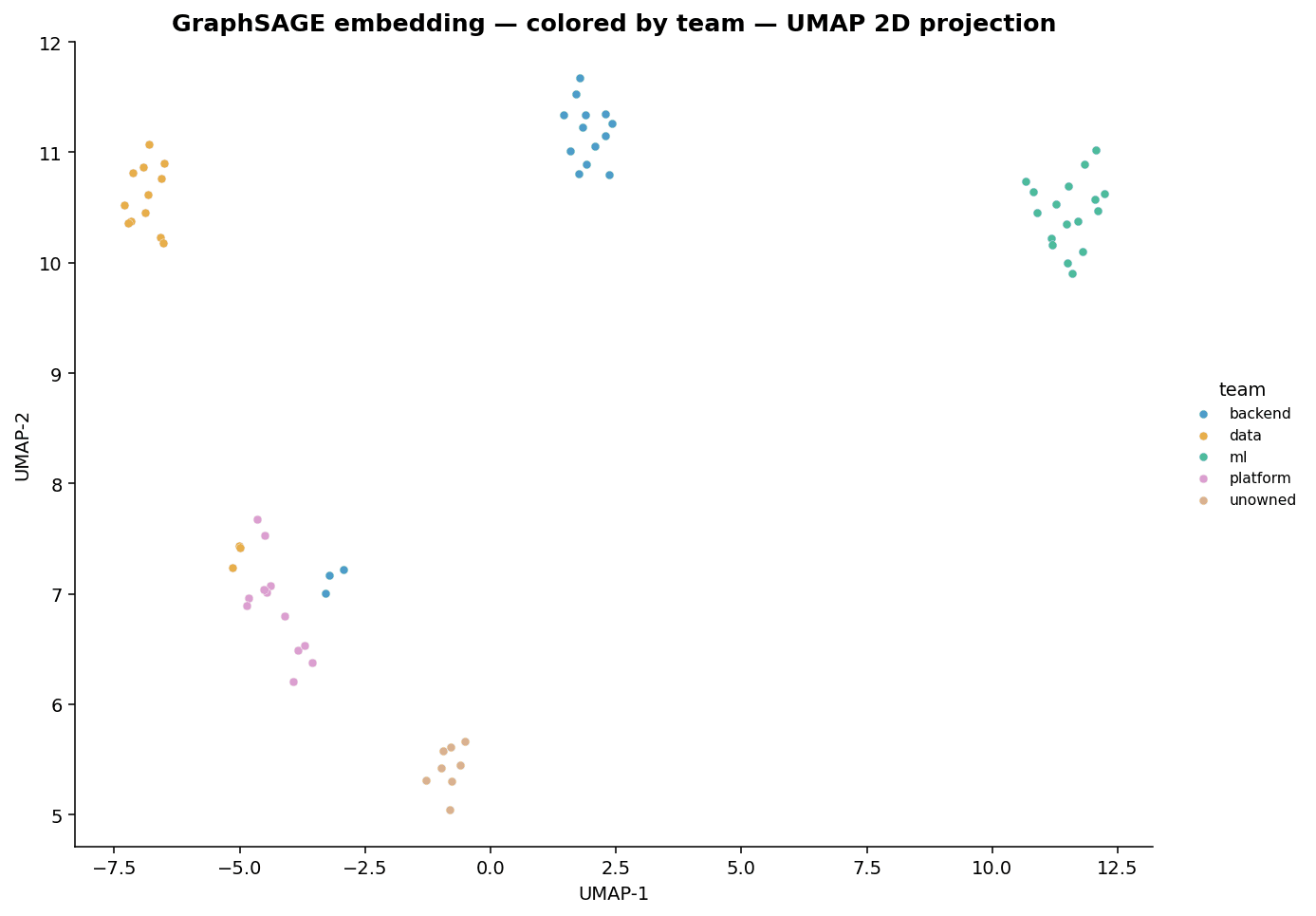
Synthetic AWS env. The tan unowned cluster (vendor / legacy / orphan / shadow resources) sits visibly apart from the team clusters. The anomaly detector catches them automatically.
Limitations and what doesn't work
The full breakdown is in docs/limitations.md. The honest highlights are below — research maturity over polish.
Behavioral attribution has a natural ceiling on thin features
On Azure's summary-CPU-only feature set, GraphSAGE's lift over feature-only baselines is small. The GNN needs richer per-resource signal (hourly time-series, full CloudTrail) to earn its complexity.
Small label sets give wide error bars
The real-AWS 87% has ±27% k-fold variance because 15 labels split 5-fold leaves 3 samples per fold. Use bigger labeled sets for production deployment decisions.
Homogeneous accounts have no behavioral signal
If every team uses one IAM role, one VPC, one calling pattern, CostDNA has nothing to fingerprint. The model only earns its keep when behavior actually differs across teams.
CostDNA is not a production-deployed tool
"I ran it on a real AWS account I owned" is different from "a user ran this on their account." The pilot validates engineering; production trust would require signed binaries, audited IAM, privacy review.
Accounts under ~100 resources are too sparse
The graph needs enough density for neighborhood aggregation to converge. Very small accounts get random-ish results regardless of how good the model is.
The synthetic env is hand-constructed
Difficulty kinds (cross_team, reassigned, shared_service, sparse) reproduce failure modes seen on real accounts, but the env is by construction the regime CostDNA was designed for. Treat synthetic numbers as ablation, not headline.
Multi-cloud architecture
The model + features are cloud-agnostic — only the collector layer is provider-specific. AWS calls cloudtrail:LookupEvents; Azure calls monitor.activity_logs.list; GCP calls cloud_logging.list_entries. All three return identical-shape DataFrames downstream.
13/15 = 87% on a Terraform-provisioned account · production-tested collectors
Audit on Microsoft's 2.6M-VM Public Dataset; live-subscription collector implemented per SDK v4 patterns but not yet run against a live account
Code follows google-cloud-asset v4 + cloud-logging protobuf payloads; mocked-shape tests pass
Optional natural-language interface
CostDNA ships with an optional natural-language interface — a 10-tool agent on top of the trained scan output. The agent uses OpenAI's function-calling API; tools are pure data lookups against the scan, so responses are fast, deterministic, and auditable. This is interface convenience, not the core contribution.
Ask anything about a synthetic AWS account with 68 resources across 4 teams. The agent has 10 tools and runs on GPT-4o.
ⓘ The agent picks tools live and chains them. Each call shows inline. Click any ▸ expand to see the raw structured response.
Live demo runs on GPT-4o · ~$0.01 per question · rate-limited to 5/IP/hour
Example transcripts
←5 anomalies, top: test-deploy-v3 (conf=0.78)▸ expand
[
  {
    "id": "test-deploy-v3",
    "team": "platform",
    "conf": 0.78,
    "note": "no name-based hint"
  },
  {
    "id": "i-286218b8",
    "team": "data",
    "conf": 0.85,
    "note": "iam_role contains 'data'"
  },
  {
    "id": "myFunction-2",
    "team": "platform",
    "conf": 0.89,
    "note": "no name-based hint"
  },
  {
    "id": "stg-rds-310c0c",
    "team": "platform",
    "conf": 0.96,
    "note": "no name-based hint"
  },
  {
    "id": "old-cron-2018",
    "team": "data",
    "conf": 0.97,
    "note": "no name-based hint"
  }
]←2 teams: ml(18 resources, $4643.56), data(19, $2318.74)▸ expand
{
  "ml": {
    "resources": 18,
    "total_cost": 4643.56,
    "top": "prod-rds-ce88cb ($399.85)"
  },
  "data": {
    "resources": 19,
    "total_cost": 2318.74,
    "top": "internal-rds-eb2263 ($374.40)"
  }
}The 10 tools (click to expand)
summarize_accountHigh-level rollup: resources, spend, confidence per team.
attribute_resourceWho owns this resource? + why-explanation.
top_spendersTop resources by cost, optionally filtered by team.
find_cost_spikesLargest spikes + Granger-causality attribution to deploys.
find_anomaliesResources that don't fit any team.
search_resourcesSubstring match across resource IDs.
signal_historyRecent CloudTrail + cost samples for one resource.
find_idleLow-activity resources.
compare_teamsSide-by-side team comparison.
find_abandonedResources whose activity collapsed in recent half.
Run it yourself
Three usage patterns — CLI, REPL, web UI. All run against the same code that produced the results above.
A.Reproduce the synthetic benchmark
$ costdna benchmark --synthetic --seeds 5
# prints the node2vec / GraphSAGE / LogReg / LabelProp tableB.Live AWS scan
$ costdna doctor --aws-profile prod
$ costdna scan --aws-profile prod --save-dir runs/todayC.Natural-language interface (optional)
$ pip install 'costdna[ui,agent]'
$ costdna serve
# open http://localhost:8501D.Docker (no install)
$ docker run --rm pauti04/costdna scan --syntheticOptional agent setup: pip install 'costdna[agent]' + export OPENAI_API_KEY=...
Stack
- ▸Python 3.11— pandas, numpy, scikit-learn, statsmodels, networkx
- ▸PyTorch 2.x + PyTorch Geometric— GraphSAGE classifier — 2 to 4 layers, residual, supervised contrastive head
- ▸gensim Word2Vec— node2vec baseline (skip-gram on biased random walks)
- ▸sentence-transformers— MiniLM embeddings of IAM role names + resource IDs + tags
- ▸boto3 (hardened)— adaptive retry, throttle-aware CloudTrail lookup_events
- ▸azure-mgmt-* + google-cloud-*— multi-cloud collectors (lazy-loaded extras)
- ▸statsmodels— Granger-causality spike attribution
- ▸Terraform— labelled AWS env with CloudTrail data events + VPC Flow Logs
- ▸pytest + GitHub Actions— CI on every commit; Docker auto-publish on tag
- ▸Next.js + Vercel— this landing page + serverless agent endpoint (optional interface)
See what your tags are hiding.
Drop your Cost & Usage Report and get a per-team breakdown of your untagged spend in 90 seconds — in your browser, nothing uploaded. Or install the open-source CLI and run the full GraphSAGE pipeline on your own account. MIT licensed, no signup.
Built by Parth Auti
CostDNA started as a question: how much of an AWS bill can you attribute without tags? The answer turned out to depend entirely on doing the methodology honestly — which is why the audit that caught label leakage in two published Microsoft datasets is checked into the repo as a reusable function, not buried in a paper.
Looking for design-partner pilots. If your team owns an AWS bill with a big "untagged" bucket and you'd run CostDNA on a non-prod account in exchange for 30 minutes of feedback, I'd like to talk.